zaterdag, september 30, 2006

Softricity: Softgrid 4.1 released!

SoftGrid 4.1 is the first post-acquisition product release and represents a significant milestone in the Softricity roadmap. This release aligns SoftGrid with other Microsoft technologies and practices.

Key enhancements in SoftGrid 4.1
  • New server management console: upgraded to MMC 3.0

  • New reporting engine, based on the Report Viewer of SQL Server Reporting Service (and deprecated the previous reporting engine based on Crystal Reports)

  • Enhanced logging to enable server monitoring via Windows event logger (and deprecated the old monitoring solution based on SNMP agent)

  • Removed license key requirement from the server to align with Microsoft standards

  • Multiple bug fixes

maandag, september 25, 2006

WTS: Longhorn server enhancements for Terminal Services

Windows Server "Longhorn" introduces new functionality in Terminal Services to connect to remote computers and applications. Terminal Services Remote Programs completely integrates applications running on a remote terminal with users’ desktops such that they behave as if they were running on an individual user's local computer; users can run programs from a remote location side-by-side with their local programs.

Terminal Services Web Access permits this same flexibility of remote application access via Web browser, granting an even wider variety of ways user can access and use programs running on remote terminals. And Terminal Services Gateway allows user to access remote terminals and remote terminal programs in a firewall-friendly manner.

HP Proliant: checking the RPM speed in HPMHP

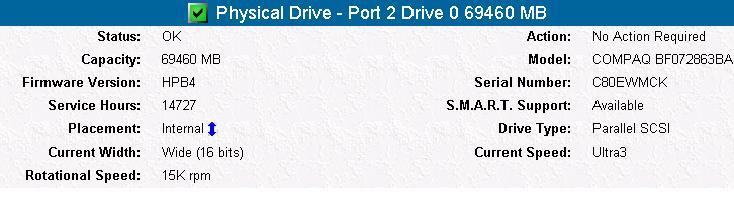
You can check your SCSI disks' RPM (10k or 15k) on the HP management homepage. Just go to https://127.0.0.1:2381/ on your server and click on Storage. Pick your Smart Array controller. On the left, you will see the "physical drives" item. Click on a disk to see more specs.

Citrix: ICA Client 9.2 Receives "Protocol Driver Error" when Connecting through CSG 3.0

A customer of mine had problems connecting to an external CSG (Citrix Secure Gateway). He received the error message "Protocol Driver Error" for some unknown reason. This is a known issue with the new Citrix 9.2 client version. I solved the issue by installing the previous version, 9.15.

The other solution is to patch your Secure gateway. For more info, see the following tech article on Citrix support

zondag, september 24, 2006

VMware: ESX Server 3.0.1 patch in October

The much rumored minor update for ESX Server 3.0.1 has been finally confirmed: VMware announced ESX Server 3.0.1 will be released in October, but the only feature mentioned is 64bits support for some Windows, Linux and Solaris editions.

Vmware.com states:
"The next release of VMware Infrastructure 3 is coming in October with VMware ESX Server 3.0.1, which incorporates full support for certain Windows, Red Hat, SUSE and Sun 64-bit guest operating systems. This feature is yet another innovation from VMware and offers customers increased performance, cost savings and a smooth transition to next generation 64-bit applications."

Tnx to virtualization.info for the news!

zaterdag, september 23, 2006

WTS: Some old & new terminal services commands

This is rather useful:
Here is a TS -commands-list for you all to enjoy!

Softricity: Altering the content directory to a global UNC

Hi all,

I would like to share this one with you:
Recently, I installed 2 VAS servers (Virtual Application Servers) and shared the database with a SQL server. So, from that moment on all config was shared between my 2 VAS servers (SR-VAS01 and SR-VAS02). But then I realised that, without using NLB you could not "share" the content directory between them. You always had to point to 1 of the VAS servers. So I installed a 3rd fileserver with a shared content directory (sr-fs01).

OK, here's what I did:
  • First, change the LOGON account for the Softgrid server service from Local system to a service account (I used svc_softricity as the service account)
  • Create a share on your fileserver named content and give read permissions (NTFS and share) to this service account
  • In the Softgrid Management Console, rightclick the server name and select system options. Change the default content path to \\sr-fs01\content

  • Change the path in the registry key HKLM\SOFTWARE\Softricity\SoftGrid Server\CurrentVersion\SOFTRICITY_SOFTGRID_CONTENT_DIR to the UNC path (\\sr-fs01\content)

  • Have phun!

donderdag, september 21, 2006

Citrix: Web Interface Session timeout

If you open the Web Interface, log in and start an application, it will log you out after a default period of 20min.

To increase this time do the following:
  1. Open the web.config file in the MetaFrame directory on the web server. Enter the following line at the first system.web section:
    <sessionState timeout="120" />

  2. Open the IIS Manager on the web server, and open the properties of the CitrixWebInterfaceAppPool. On the Performance tab change the value of the worker process time out to a value greater or equal to the value in web.config

woensdag, september 06, 2006

HP Insight Manager Agents for VMware ESX Server

Here is a small tutorial on configuring the Insight Manager Agents for VMware ESX Server

1) Go to the HP website and search for HP Insight Manager Agents for VMware ESX Server
2) Download the Agents
3) Open WinSCP and upload the .tar file you just downloaded to the (for example) /home/<username> folder
4) Log into putty with your normal user account and issue the su command to become root
5) Issue the following command to unzip the contents:
tar -zxvf hpmgmt-7.5.1a-vmware.tgz.
This will create a new subdirectory home/<username>/hpmgmt/751
6) You must enable the firewall port for the `hpim' service (2381) for accessing the System Management Homepage. The `snmpd' service should be enabled in the firewall for the Insight Manager agents to communicate properly with the hp Systems Insight Manager. These ports can be enabled by using the "esxcfg-firewall" command in the service console, or by answering 'y' when prompted by the installation script.
7) To read the readme.txt, you can issue the following command on the command line: cat README.txt
8) After reading the README.txt and to begin the installation, issue the command ./installvm741.sh –install
9) Follow the wizard, when asked for the public string enter (if you use this string) public 2 times (it will not be visible), and be sure to have the HP SIM server's IP or FQDN. Always answer Y when asked to activate the port 2381 (HPMHP) & Snmpd deamon.
10) To check if the configuration has succeeded, log in to the HP System Homepage https://<esx server>:2381/. You should see the servername on the right side.

maandag, september 04, 2006

The hunt for the bad print driver

I read a great article (and great tools :) ) to troubleshoot and find the one print driver that is driving your SBC servers mad.

Check it out in Stefan Vermeulen's article

VMware: ESX Server to allow 3rd party storage add-on integration

This is great news! Apparently, VMWare wants to allow third party software vendors to run their propriety multipathing and load balancing software within the vmkernel!
Currently, you only have the option to do a failover, not loadbalancing.

To read more, go to virtualization.info

Reattaching the MASTER DB in SQL Server

I decided to post a small tutorial on restoring a SQL server by means of the master.mdf database. Here goes:

- Install & stop SQL Server 2000
- Move the master.mdf & mastlog.ldf files to the new location
- Open regedit and go to the following key:
HKLM\SOFTWARE\Microsoft\MSSQLServer\MSSQLServer\Parameters
- Adjust the paths in the following screenshot

- Restart SQL Server services
- Done :) All user & system db's should be showing up.

zondag, augustus 27, 2006

HP SmartStart - Supported OS for Assisted Installation

SmartStart assisted installation supports the following operating systems:
  • Windows 2000 (Standard, Advanced Server and Small Business Server)
  • Windows 2003 (Standard, Enterprise, Small Business Server and R2)
  • Windows Server 2003 for x64 editions (Standard and Enterprise)
  • Novell NetWare 5.1, 6.5 and 6.6
  • SUSE LINUX Enterprise Server 9 (X86 and AMD64/EM64T)
  • Red Hat Enterprise Linux 4 (X86 and AMD64/EM64T)
  • Red Hat Enterprise Linux 3 (X86 and AMD64/EM64T)
View the updated OS supported list.

ESX 2.5: expanding RDM LUN's

We got a question from a customer about disk expansion in combination with RDMs in ESX 2.5. Check it out on Baeke's blog!

woensdag, augustus 23, 2006

Adding a Generic SCSI Device in Vmware/GSX Server

To add a Generic SCSI device in Vmware GSX/Server, you should follow the guidelines in the article you can find on http://www.vmware.com/support/gsx3/doc/devices_genscsi_gsx.html

Citrix: Make autocreated printers available to Admins/Power Users

As you may already know, all client printers are visible to Local Administrators/Power Users. However, it is not possible to manage these printers without taking ownership (via Security tab). You get an "Access Denied".

You can, however, set a global flag to enable managebility. Use regedit and do the following:
- Add a registry key on the server: HKLM\Software\Citrix\Print
- Add a REG_DWORD with the value "DefaultPrnFlags"
- Set the bit to 0x00004000
- Reboot

This feature is also covered in the Citrix Advanced Concepts Guide, available here

Citrix EMF UPD driver improvements & limitations

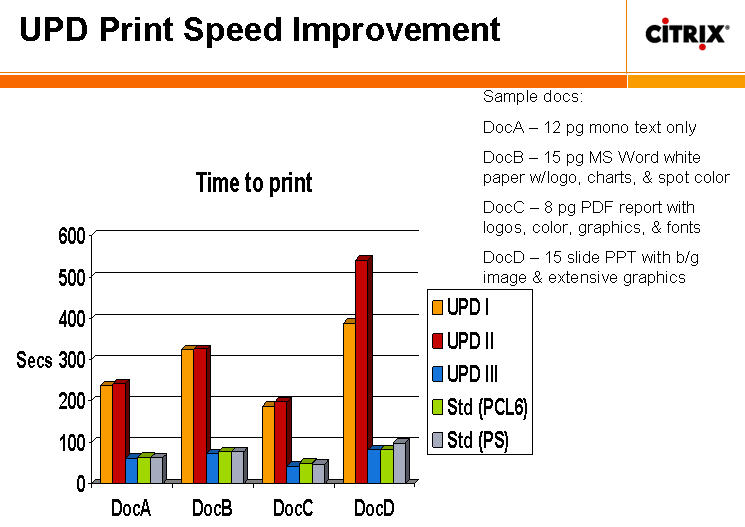
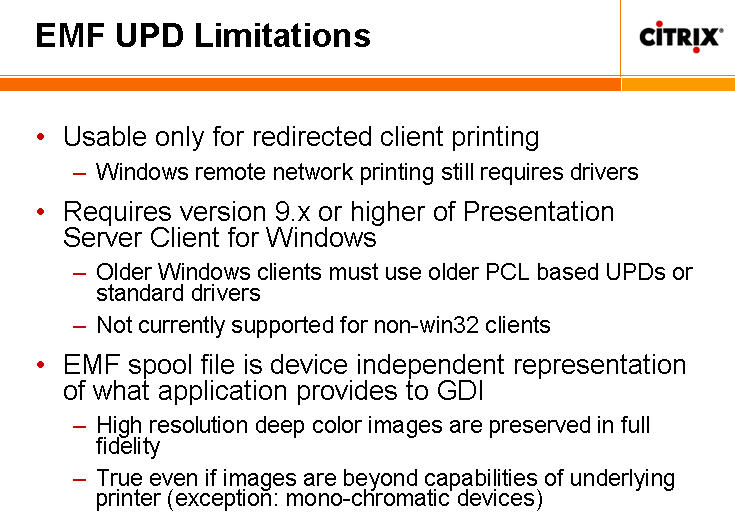
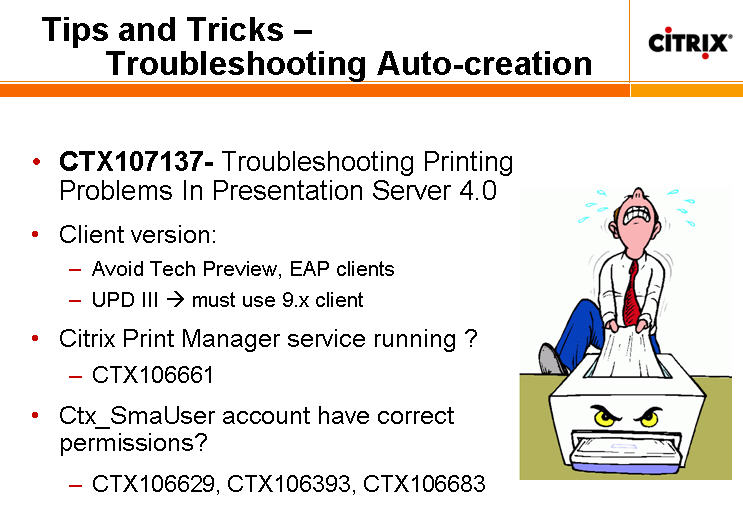
I listened to a webcast this evening presented by Gary Barton, a principle design engineer and the father of all UPD drivers in Citrix since the beginning. It was very interesting indeed!!!

To summarize, a few screenshots of the presentation:

Performance inmprovements by using the new EMF UPD III printer driver:


EMF limitations:


Tips & Tricks on Printing troubleshooting:

Citrix autocreation errors/info/warnings in event log

Some people may find this interesting: normally, a failure to auto-create a client printer will result in your eventlog filled with warning/info/error messages.
To avoid this, use regedit and do the following:
- Add a registry key on the server: HKLM\Software\Citrix\Print
- Add a REG_DWORD with the value "DefaultPrnFlags"
- Set the bit to 0x08000000
- Reboot & your event log will be clean (from now on) :)

This feature is also covered in the Citrix Advanced Concepts Guide, available here

maandag, augustus 21, 2006

SNMP settings for HP Homepage

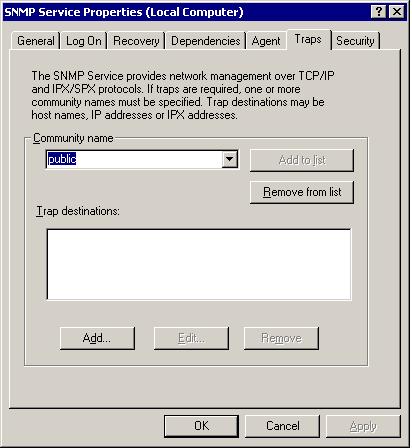
Sometimes you get the "System Model: unknown" when installing the PSP (Proliant Support Pack) after installing the OS (without using SmartStart).
You should install the SNMP service first via Add/Remove Windows Components and configure it like in the following screenshots:


vrijdag, augustus 18, 2006

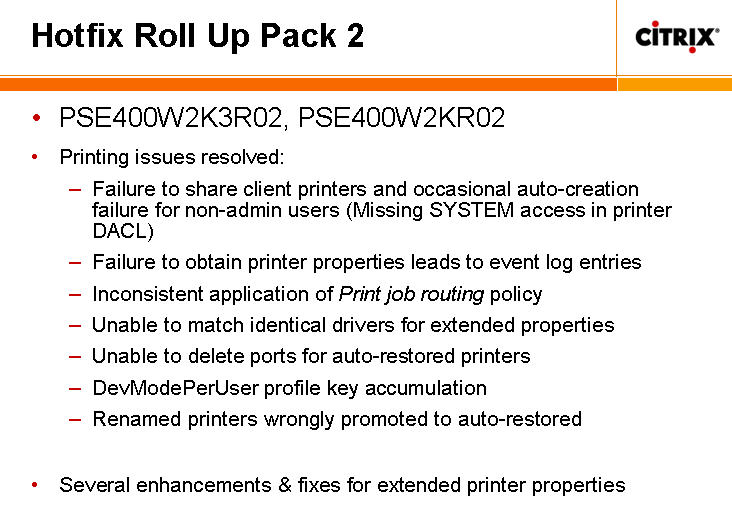
Citrix R02 Hotfix Rollup Pack released


Citrix just released the new R02 Hotfix Rollup Pack for servers running Windows Server 2003 with one of the following installed:
  • Citrix Presentation Server 4.0
  • Presentation Server 3.0 with Service Pack 2005.4
  • Citrix Access Essentials 1.5
  • Citrix Access Essentials 1.0

Before installing this hotfix rollup pack, you must uninstall the following hotfixes, if present, from Add/Remove Programs on the Control Panel. Failing to do so may lead to system inconsistencies:
  • PSE400W2K3029
  • PSE400R01W2K3004
  • PSE400R01W2K3053

Download it here.

I hope this fixes the print spooler crashes :)