dinsdag, november 14, 2006
Citrix: Comparing Longhorn WTS to Citrix PS Application Publishing
Katie Poepke..I mean Koepke has an excellent article on Application Publishing. She compares Longhorn Terminal Services Remote programs to Citrix Presentation Server Published applications. Check it out on the BrianMadden website

Citrix: Session Sharing Explained
Patrick Rouse wrote a very interesting article on Citrix session sharing & how you can enable/disable this feature when publishing desktops or applications. Check it out here!
vrijdag, november 10, 2006
Visio stencils for hardware
I just discovered a great place to download a lot of hardware-related visio stencils. Check it out: http://www.visiocafe.com
woensdag, november 08, 2006
Announcing Process Monitor v1.0
The sysinternal guys released a new tool: Process Monitor.
Process Monitor is an advanced monitoring tool for Windows that shows real-time file system, Registry and process/thread activity. It combines the features of two legacy Sysinternals utilities, Filemon and Regmon, and adds an extensive list of enhancements including rich and non-destructive filtering, comprehensive event properties such session IDs and user names, reliable process information, full thread stacks with integrated symbol support for each operation, simultaneous logging to a file, and much more. Its uniquely powerful features will make Process Monitor a core utility in your system troubleshooting and malware hunting toolkit.
Process Monitor runs on Windows 2000 SP4 with Update Rollup 1, Windows XP SP2, Windows Server 2003, and Windows Vista as well as x64 versions of Windows XP, Windows Server 2003 and Windows Vista.
Check it out here
Process Monitor is an advanced monitoring tool for Windows that shows real-time file system, Registry and process/thread activity. It combines the features of two legacy Sysinternals utilities, Filemon and Regmon, and adds an extensive list of enhancements including rich and non-destructive filtering, comprehensive event properties such session IDs and user names, reliable process information, full thread stacks with integrated symbol support for each operation, simultaneous logging to a file, and much more. Its uniquely powerful features will make Process Monitor a core utility in your system troubleshooting and malware hunting toolkit.
Process Monitor runs on Windows 2000 SP4 with Update Rollup 1, Windows XP SP2, Windows Server 2003, and Windows Vista as well as x64 versions of Windows XP, Windows Server 2003 and Windows Vista.
Check it out here
dinsdag, november 07, 2006
VMware: Setting Regional settings for a template
An annoying thing while deploying a template in VirtualCenter is the fact that the regional settings are always defaulted to English-US. VirtualCenter uses the following files to run a sysprep on a template machine:
1) VMware VirtualCenter 2.0\scripts\gensysprepinf.vbs
2) VMware VirtualCenter 2.0\scripts\autoprep.wsf
These are the steps to follow (this example is for Belgium):
You can generate your own country codes by downloading the sysprep tools from http://www.microsoft.com/downloads and running setupmgr.exe
1) VMware VirtualCenter 2.0\scripts\gensysprepinf.vbs
2) VMware VirtualCenter 2.0\scripts\autoprep.wsf
These are the steps to follow (this example is for Belgium):
- Make a backup of both files
- Decrypt the files mentioned above. By default, they are encrypted
- Edit gensysprepinf.vbs
- find the following string:
if mProductID <> "" then
outStr = outStr _
& " ProductID=" & mProductID & vbCrLf
end if - add the following part AFTER the string just mentioned:
outStr = outStr _
&vbCrLf _
&"[RegionalSettings]" & vbCrLf _
&" LanguageGroup=1" & vbCrLf _
&" SystemLocale=00000813" & vbCrLf _
&" UserLocale=00000813" & vbCrLf _
&" InputLocale=0813:00000813" & vbCrLf - Save it in the appropriate directory (VMware VirtualCenter 2.0\scripts\gensysprepinf.vbs)
- Edit autoprep.wsf
- Find the string <script language="VBScript.Encode" src="gensysprepinf.vbs">
- Alter the string to <script language="VBScript" src="gensysprepinf.vbs">
- Save the file in the appropriate directory (VMware VirtualCenter 2.0\scripts\autoprep.wsf)
- Done
You can generate your own country codes by downloading the sysprep tools from http://www.microsoft.com/downloads and running setupmgr.exe
maandag, november 06, 2006
VMware: Extending partitions with GParted
Baeke has an interesting article on extending the Windows system partition with a free tool called GParted (Gnome Partition Editor). It can be downloaded here.
zondag, oktober 29, 2006
VMware: Bitvise Tunnelier
Bitvise Tunnelier is a great SSH and SFTP client for Windows. It's like putty and Veeam FastSCP (and much much more!) all-in-wonder. And most importantly... it free!.
Check it out on http://www.bitvise.com
Check it out on http://www.bitvise.com
Citrix: CPS 4.5 Technology Preview Available For Download
The next version of Citrix Presentation server (Project "Ohio") is now available for download as a technology preview on http://www.mycitrix.com.
Health Monitoring & Recovery
Monitors the health of many Presentation Server components and reports any failures instantly. If a component fails, it can be configured to trigger an action to the server.
Configuration logging
Logs any changes made to the farm to a database and provides reporting capabilities.
Non-administrator client installation
Allows end users without administrative rights to install a client.
SpeedScreen Progressive Display
Provides an aggressive compression algorithm for graphic-intensive applications, through a connection policy, to improve the performance and responsiveness of these applications.
Active Directory Federation Services (ADFS) support
Extends the value of Microsoft’s Active Directory and Identity Federation technology by allowing Presentation Server-hosted applications to participate in federation trusts. Without Citrix, ADFS can only be used with Web Applications.
Application streaming
Provides applications to be packaged and delivered to Presentation Server without having to install them in every server.
Health Monitoring & Recovery
Monitors the health of many Presentation Server components and reports any failures instantly. If a component fails, it can be configured to trigger an action to the server.
Configuration logging
Logs any changes made to the farm to a database and provides reporting capabilities.
Non-administrator client installation
Allows end users without administrative rights to install a client.
SpeedScreen Progressive Display
Provides an aggressive compression algorithm for graphic-intensive applications, through a connection policy, to improve the performance and responsiveness of these applications.
Active Directory Federation Services (ADFS) support
Extends the value of Microsoft’s Active Directory and Identity Federation technology by allowing Presentation Server-hosted applications to participate in federation trusts. Without Citrix, ADFS can only be used with Web Applications.
Application streaming
Provides applications to be packaged and delivered to Presentation Server without having to install them in every server.
dinsdag, oktober 10, 2006
Citrix/WTS: debug user logons
If you ever experience slow/erratic logins, you can use the userenvdebuglevel (a dword value in the registry). No reboot is necessary.
This will create a userenv.log file in the Windows/debug/usermode directory. It is really helpful to determine delays in login processes!
See also:
http://support.microsoft.com/kb/221833/en-us
This will create a userenv.log file in the Windows/debug/usermode directory. It is really helpful to determine delays in login processes!
See also:
http://support.microsoft.com/kb/221833/en-us
Citrix/WTS: UPHClean "reminder"
Just to remind everybody about it: ALWAYS install UPHClean on a Citrix/WTS server.
The User Profile Hive Cleanup service helps to ensure user sessions are completely terminated when a user logs off. System processes and applications occasionally maintain connections to registry keys in the user profile after a user logs off. In those cases the user session is prevented from completely ending. This can result in problems when using Roaming User Profiles in a server environment or when using locked profiles as implemented through the Shared Computer Toolkit for Windows XP.
See the link in my toolbox to download it!
The User Profile Hive Cleanup service helps to ensure user sessions are completely terminated when a user logs off. System processes and applications occasionally maintain connections to registry keys in the user profile after a user logs off. In those cases the user session is prevented from completely ending. This can result in problems when using Roaming User Profiles in a server environment or when using locked profiles as implemented through the Shared Computer Toolkit for Windows XP.
See the link in my toolbox to download it!
Citrix: Web Interface 4.5 preview
Thomas Koetzing has a short article on the new Web Interface 4.5 features. Check it out on his website
woensdag, oktober 04, 2006
BriForum Europe 2006
So we finally arrived at BriForum 2006 in Darmstadt. I'm really excited about it & I will post some more details later!
zaterdag, september 30, 2006
Softricity: Softgrid 4.1 released!
SoftGrid 4.1 is the first post-acquisition product release and represents a significant milestone in the Softricity roadmap. This release aligns SoftGrid with other Microsoft technologies and practices.
Key enhancements in SoftGrid 4.1
Key enhancements in SoftGrid 4.1
- New server management console: upgraded to MMC 3.0
- New reporting engine, based on the Report Viewer of SQL Server Reporting Service (and deprecated the previous reporting engine based on Crystal Reports)
- Enhanced logging to enable server monitoring via Windows event logger (and deprecated the old monitoring solution based on SNMP agent)
- Removed license key requirement from the server to align with Microsoft standards
- Multiple bug fixes
maandag, september 25, 2006
WTS: Longhorn server enhancements for Terminal Services
Windows Server "Longhorn" introduces new functionality in Terminal Services to connect to remote computers and applications. Terminal Services Remote Programs completely integrates applications running on a remote terminal with users’ desktops such that they behave as if they were running on an individual user's local computer; users can run programs from a remote location side-by-side with their local programs.
Terminal Services Web Access permits this same flexibility of remote application access via Web browser, granting an even wider variety of ways user can access and use programs running on remote terminals. And Terminal Services Gateway allows user to access remote terminals and remote terminal programs in a firewall-friendly manner.
Terminal Services Web Access permits this same flexibility of remote application access via Web browser, granting an even wider variety of ways user can access and use programs running on remote terminals. And Terminal Services Gateway allows user to access remote terminals and remote terminal programs in a firewall-friendly manner.
HP Proliant: checking the RPM speed in HPMHP
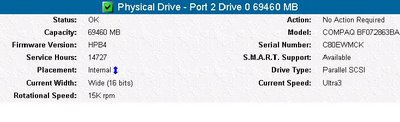
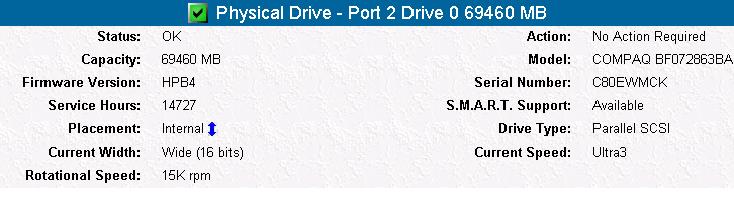
You can check your SCSI disks' RPM (10k or 15k) on the HP management homepage. Just go to https://127.0.0.1:2381/ on your server and click on Storage. Pick your Smart Array controller. On the left, you will see the "physical drives" item. Click on a disk to see more specs.
Citrix: ICA Client 9.2 Receives "Protocol Driver Error" when Connecting through CSG 3.0
A customer of mine had problems connecting to an external CSG (Citrix Secure Gateway). He received the error message "Protocol Driver Error" for some unknown reason. This is a known issue with the new Citrix 9.2 client version. I solved the issue by installing the previous version, 9.15.
The other solution is to patch your Secure gateway. For more info, see the following tech article on Citrix support
The other solution is to patch your Secure gateway. For more info, see the following tech article on Citrix support
zondag, september 24, 2006
VMware: ESX Server 3.0.1 patch in October
The much rumored minor update for ESX Server 3.0.1 has been finally confirmed: VMware announced ESX Server 3.0.1 will be released in October, but the only feature mentioned is 64bits support for some Windows, Linux and Solaris editions.
Vmware.com states:
"The next release of VMware Infrastructure 3 is coming in October with VMware ESX Server 3.0.1, which incorporates full support for certain Windows, Red Hat, SUSE and Sun 64-bit guest operating systems. This feature is yet another innovation from VMware and offers customers increased performance, cost savings and a smooth transition to next generation 64-bit applications."
Tnx to virtualization.info for the news!
Vmware.com states:
"The next release of VMware Infrastructure 3 is coming in October with VMware ESX Server 3.0.1, which incorporates full support for certain Windows, Red Hat, SUSE and Sun 64-bit guest operating systems. This feature is yet another innovation from VMware and offers customers increased performance, cost savings and a smooth transition to next generation 64-bit applications."
Tnx to virtualization.info for the news!
zaterdag, september 23, 2006
WTS: Some old & new terminal services commands
This is rather useful:
Here is a TS -commands-list for you all to enjoy!
Here is a TS -commands-list for you all to enjoy!
Softricity: Altering the content directory to a global UNC
Hi all,
I would like to share this one with you:
Recently, I installed 2 VAS servers (Virtual Application Servers) and shared the database with a SQL server. So, from that moment on all config was shared between my 2 VAS servers (SR-VAS01 and SR-VAS02). But then I realised that, without using NLB you could not "share" the content directory between them. You always had to point to 1 of the VAS servers. So I installed a 3rd fileserver with a shared content directory (sr-fs01).
OK, here's what I did:
I would like to share this one with you:
Recently, I installed 2 VAS servers (Virtual Application Servers) and shared the database with a SQL server. So, from that moment on all config was shared between my 2 VAS servers (SR-VAS01 and SR-VAS02). But then I realised that, without using NLB you could not "share" the content directory between them. You always had to point to 1 of the VAS servers. So I installed a 3rd fileserver with a shared content directory (sr-fs01).
OK, here's what I did:
- First, change the LOGON account for the Softgrid server service from Local system to a service account (I used svc_softricity as the service account)
- Create a share on your fileserver named content and give read permissions (NTFS and share) to this service account
- In the Softgrid Management Console, rightclick the server name and select system options. Change the default content path to \\sr-fs01\content
- Change the path in the registry key HKLM\SOFTWARE\Softricity\SoftGrid Server\CurrentVersion\SOFTRICITY_SOFTGRID_CONTENT_DIR to the UNC path (\\sr-fs01\content)
- Have phun!
donderdag, september 21, 2006
Citrix: Web Interface Session timeout
If you open the Web Interface, log in and start an application, it will log you out after a default period of 20min.
To increase this time do the following:
To increase this time do the following:
- Open the web.config file in the MetaFrame directory on the web server. Enter the following line at the first system.web section:
<sessionState timeout="120" /> - Open the IIS Manager on the web server, and open the properties of the CitrixWebInterfaceAppPool. On the Performance tab change the value of the worker process time out to a value greater or equal to the value in web.config
Abonneren op:
Posts (Atom)

