donderdag, december 14, 2006

VMware: manual multipathing explained

ESX does not support dynamic multipathing. Therefore, manual multipathing must be configured on each ESX host. This is necessary, because if all datastores use the same path, I/O contention can appear. Example: as we are using an IBM DS 8000, we are able to use 8 targets (Storage Processors) on the device. An ESX host itself has 2 HBA’s (vmhba), so in total we have 16 paths to use.

A path is created by combining 3 components: HBA ID, target ID and LUN ID:

vmhbaX:Y:Z, where:

  • X is the HBA ID (example: vmhba1)
  • Y is the Target ID (example: vmhba1:0)
  • Z is the LUN ID (example: vmhba1:0:0)

It is therefore easy to calculate the optimal path (see screenshot below). For the best performance, make sure all paths are divided equally. In our example below, vmhba1 has 4 paths and vmhba2 has 4 paths. Each target has 1 path. There are 8 SAN LUNs configured. When additional LUNs are created, (example: LUN 8), target 0 will get 2 paths, etc.


  • Start the VI client & select a specific host
  • Go to Configuration => Storage and select a datastore
  • Click on properties => Manage paths
  • Make sure FIXED (active/active array) is selected
  • Use the results above to easily set a specific path (example: vmhba1:4:4)
  • Click on Change and select Preferred to activate this path
  • Repeat for all datastores/ESX host
  • Have fun :)

Citrix: Understanding context switches

Thomas Koetzing has written an excellent article on understanding context switches in a Citrix environment. He uses process explorer (and perfmon) to track problems.

Check it out here

woensdag, december 13, 2006

VMware: moving VMs between datacenters

Ever wondered how you could easily move a VM from one datacenter to another? Wonder no more! You can use VMware Converter (in beta now & free) to export & inject a VM from one VC/ESX host to another VC/ESX host on the fly. Converter is in fact a combination of VM Importer 2.0 and the good ol' P2V assistant.


This is great for DR purposes! The only drawback now is that Converter is still rather slow in importing/exporting VMs and the VM has to be shutdown before migration...

Citrix: free techie Videos

Citrix has released some free technical how-to videos:
  • Optimizing Printing in Presentation Server 4 environments
  • Configuring Policies in Presentation Server 4
  • Understanding and Designing Citrix Presentation Server 4 Farms
  • Deep Dive into Citrix Presentation Server SpeedScreen Technologies
  • Fundamentals of the Citrix Presentation Server Architecture
  • Licensing Essentials
  • Migrating your Microsoft Windows Terminal Servers to a Citrix Presentation Server Farm

Check them out here

VMware: Combining .lic license files

As you may know, the license server for VI3 (provided by FlexLM) can only use 1 license file. This file is called vmware.lic and is stored (latest version) in C:\Program Files\VMware\VMware License Server. As the .lic file is a plain text file, it is easy to combine 2 .lic files into one.

The first part looks like this, don't touch it!:

SERVER this_host ANY 27000
VENDOR VMWARELM port=27010
USE_SERVER

Then you have the VC license:

INCREMENT PROD_VC VMWARELM 2007.03 permanent 1 \
VENDOR_STRING=licenseType=Server ISSUED=12-Jan-2007 \
NOTICE=FulfillmentId=1234 SIGN="1234 1234 1234 1234 1234 1234 \
1234 1234 1234 1234 1234 1234 1234 1234 1234 1234 1234 1234 \
1234 1234 1234 1234 1234 1234 1234 1234 1234 1234 1234 1234"

Now comes the fun part :)

  • Stop the VMware License server service via services.msc
  • Make a backup of your vmware.lic file
  • Open vmware.lic file with wordpad (NOT notepad)
  • As the license file uses increments, you can just copy/paste INCREMENT parts in the .lic file (in any order you would like). Example to combine an 8+8 license:

INCREMENT VC_ESXHOST VMWARELM 2006.07 permanent 8 \
VENDOR_STRING=licenseType=Server;capacityType=cpuPackage \
ISSUED=21-Jan-2007 NOTICE=FulfillmentId=1234 SIGN="1234 1234 1234 1234 1234 1234 \
1234 1234 1234 1234 1234 1234 1234 1234 1234 1234 1234 1234 \
1234 1234 1234 1234 1234 1234 1234 1234 1234 1234 1234 1234"

INCREMENT VC_ESXHOST VMWARELM 2007.07 permanent 8 \
VENDOR_STRING=licenseType=Server;capacityType=cpuPackage \
ISSUED=21-Jun-2007 NOTICE=FulfillmentId=1234 SIGN="1234 1234 1234 1234 1234 1234 \
1234 1234 1234 1234 1234 1234 1234 1234 1234 1234 1234 1234 \
1234 1234 1234 1234 1234 1234 1234 1234 1234 1234 1234 1234"

  • Restart the VMware License server service
  • Go to VMware License server tools
  • Perform a status Enquiry in the Server Status tab to see if it has combined all available licenses (the screenshot shows 16 VC_ESXHOST licenses: succes :) )


VMware: ESX freeze on SAN Rescan

FYI: be very VERY careful when doing a rescan in the VI client. If you are using VI client 2.0.1 the rescan san will scan for both new storage adapters and new vmfs volumes at the same time which causes LUN thrashing and hangs the server. In version 2.0 it scans them one at a time. A bug report has been submitted to VMware. In the future just scan for either one at a time and you should be fine!


Tnx to Dan Pierson for the info...

maandag, december 11, 2006

VMware: VCB, TSM & VM groups

I am currently working on a VCB implementation for a very large customer (together with Geert Baeke). The customer uses TSM (Tivoli Storage Manager) to backup full .vmdk files.

TSM uses a pre-command to snapshot a list of VMs. However, this is a string in a small textbox. It works in the following format: pre-command <jobname> <VM1.FQDN> <VM2.FQDN> <...>. Needless to say this is very difficult to maintain and is error-prone. That's why I wrote a vbscript to replace the default pre-command.bat file and use a text file as VM list.

---------------------------------------------------------------Option Explicit
On Error Resume Next

Const ForReading = 1, ForWriting = 2, ForAppending = 3
Const TristateUseDefault = -2, TristateTrue = -1, TristateFalse = 0

Dim strVCBFile, strVCBList, strPreCmd, strJobName, objFSO, objShell, objFile, objStream, strStream

strVCBFile = "VCBList.txt"
strPreCmd = "pre-command.bat"
strJobName = "VMFullJob"
strVCBList = ""

Set objFSO = CreateObject("Scripting.FileSystemObject")
Set objShell = CreateObject("Wscript.Shell")

If objFSO.FileExists(strVCBFile) Then
Set objFile = objFSO.GetFile(strVCBFile)
Set objStream = objFile.OpenAsTextStream(ForReading, TristateUseDefault)
Do While Not objStream.AtEndOfStream
strStream = objStream.readline
strStream = Trim(strStream)
strVCBList = strVCBList & " " & strStream
Wscript.echo strVCBList
Loop
'run the backup command
objShell.Run strPreCmd &amp; " " & strJobName & strVCBList
Else
'do nothing
End If

'cleanup
Set objFile = nothing
Set objStream = nothing
Set objFSO = nothing

---------------------------------------------------------------

Additional steps to perform:

  • Create a pre-command.vbs with the above content
  • Create a VCBList.txt file that looks like this (use enter to seperate):
  • VM1.contoso.com-FullVM
    VM2.contoso.com-FullVM

  • Copy the pre-command.vbs & VCBList.txt in the folder where pre-command.bat is located (for TSM this is C:\Program Files\Tivoli\TSM\baclient)
  • Edit the scheduler to add the pre-command.vbs in the preschedule command window (via Edit -> Preferences and the scheduler TAB)
  • Do NOT forget to also set the post-command WITH THE SAME JOBNAME
  • Test :)

woensdag, december 06, 2006

Citrix: client 9.230 released

Citrix released an updated Citrix Presentation Server Client Package version 9.230. This is NOT a Vista release yet. Download it here

maandag, december 04, 2006

VMware: HA cluster configuration and DNS

Be aware of the fact that HA (High Availability) in VirtualCenter depends heavily on DNS: make sure all your ESX hosts (and VirtualCenter server) can ping all hosts by FQDN & hostname! If you fail to do this, the HA configuration will generate an error stating "an error occurred during configuration of the HA Agent on the host". Also, do not forget to check static WINS entries!

Citrix: Secure Gateway and HP PSP updates

A customer of ours had a problem with his Secure Gateway after the firmware and management software (HP Proliant Support Pack) where updated to the latest versions. The CSG and HPMHP (Management Homepage) use Apache as there default webserver, so a specific .exe file rotatelogs.exe gets replaced by HP.

Use the following workaround:

  1. Locate the rotatelogs.exe file for Secure Gateway. This file is normally located in the C:\Program Files\Citrix Secure Gateway\bin folder.
  2. Rename the rotatelogs.exe executable (for example, rotate.exe).
  3. Open the http.conf file located in the C:\Program Files\Citrix\Citrix Secure Gateway\conf folder. To do so, perform the following procedure:
    1. Open a command prompt window.
    2. Navigate to the C:\Program Files\Citrix\Citrix Secure Gateway\conf folder from within the command prompt.
    3. In the command prompt window, type notepad httpd.conf to open the httpd.conf file.
      Note
      : The httpd.conf file is hidden. You cannot open the file unless you use a text editor.
  4. Create a backup of the file (for example, httpd.conf.bak).
  5. Modify the httpd.conf file and replace rotatelogs.exe with the new executable name (for example, rotate.exe).
  6. Restart Secure Gateway (for the new changes to take effect. Process Explorer should reflect the new changes).
  7. After performing the changes, set the HP Management Homepage Service to Automatic (or the other third-party application).
  8. Restart the system and test against the problem.

vrijdag, december 01, 2006

VMware: memory reservations and swap files

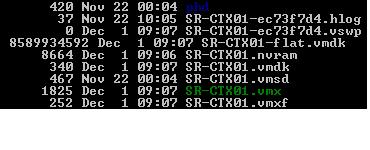
I just wanted to point out that there is a strong correlation between the memory reservation and the swap file (.vswp).

By default, no reservations are made and the .vswp is created with (in our case) 2 Gb, because we allocated 2Gb to the Virtual Machine:


This reservation can be changed in the resource allocation window of a particular VM:


Once this is set to the maximum value, the .vswp file will be 0 (as shown in the screenshot below)


The size of the VM swap space .vswp file is the allocated VM RAM - the reservation.

vrijdag, november 24, 2006

Microsoft: password policy limitations

I sometimes get asked what the limitations are for the default password policy in a Windows AD domain. Here goes:
  • You can only enforce one password policy per domain
  • Password Never Expires: If selected, the password for this account never expires. This setting overrides the domain account policy. Generally, it's not a good idea to set a password so it doesn't expire because this defeats the purpose of having passwords in the first place. But it is useful in combination with service accounts
  • Should be applied on the ROOT domain container

VMware: VMworld 2006 presentations

The presentations & audio recordings from VMworld are available at http://www.vmware.com/vmtn/vmworld

Microsoft: Windows Virtualization Session

Baeke had a sneak preview on the new Longhorn virtualization ESX wannabee. All in all, it looks very promising! Check his post here

donderdag, november 23, 2006

General: To Virtualize Applications or not

Ruben Spruijt has written an excellent article (in dutch) on application virtualization. He compares Softgrid, SVS and Citrix Streaming and their (dis)advantages. Download the article here (in pdf format).

Citrix: Web Interface 4.5 available now

As mentioned in the title: the all-new Web Interface for Citrix has been released. You can download it on http://www.mycitrix.com

Version 4.5 of WI introduces the following new features:
  • Web-based Self-Service Password Reset support for Password Manager 4.5
  • Password expiration notification
  • Application streaming support for the soon-to-be-released streaming product (Project Tarpon)
  • Built-in support for Active Directory Federation Services
  • Published application URLs – drag and drop app icons from the web page to your desktop, or add applications to your IE Favorites list!
  • Enhanced rebranding support from within the Access Management Console
  • Supports SSL encryption of Configuration Manager traffic

  • Based on .NET 2.0

VMware: how big can VM snapshots grow?

Ever wondered how big a VM snapshot (redo file) could grow? It seems that snapshots can only grow to a max of the size of the original VMDK, and never larger. Multiple changes to the same block are only stored once. So the snapshot for a 30GB VMDK could ultimately grow as big as 30GB if every block changes needing a total of 30GB.

VMware: VMotion Info tool

I found a very interesting & easy to use tool to check CPU compatibility of your ESX hosts via VirtualCenter.

Interested in knowing if all your physical ESX servers are the same? VMotion Info will help you find out. The application gathers the important system information from your hosts and puts this in one single overview.

Check it out on Run-Virtual. Install, connect to your VirtualCenter & enjoy! .NET Framework 2.0 is required to run!

woensdag, november 22, 2006

HP hardware: c-class blades & ESX

I recently visited a Citrix conference in Antwerp. There was a very technical session on the new HP c-class blades. I can only imagine the things you could do with this hardware setup in an ESX environment. 16 HH blades in a small 10 U enclosure, in combination with a 2 socket, quad-core CPU blade. A true datacenter-in-a-box. The thing that really did stand out is HP Virtual Connect or the ability to virtualize hardware (say HBAs or NICs) inside the enclosure. Finally, true plug-and-play of a blade can be achieved in this way.Cool!

HP Virtual Connect for the HP BladeSystem c-Class

HP has addressed connectivity as part of an overall virtualization strategy. HP Virtual Connect technology works with other virtualization technologies – such as virtual machines, clients and storage to make a fully virtualized environment a reality.

HP Virtual Connect pools and abstracts the LAN and SAN connections to servers and virtual machines in the HP BladeSystem to provide ultimate server flexibility and eliminate time intensive management processes.


HP Virtual Connect – Breaking down barriers to change

HP Virtual Connect modules for HP BladeSystem make LAN and SAN connections available to a pool of up to 64 servers, allowing administrators to define a server’s I/O connections to independently manage blade servers and their connectivity. Connections and configurations between server blades and the LAN and SAN can then be deployed at the click of a button, and migrated to another server bay instantly – all without disturbing the LAN or the SAN settings or administrators. Provisioning and maintenance time are slashed, productivity is improved, and customers gain the ability to more easily pool server resources.

VMware: physical switch load balancing

One of the most difficult (and almost undocument) features of ESX is to configure your switch for assisted load balancing for a VM Network vswitch with more then 1 pNICs. You should be aware of the fact that ESX supports 802.3ad Static only (EtherChannel).

In essence, you need 2 things:
1. A load balancing schema on your switch port group, based on the switch configuration. The trick here is to setup your vSwitch load balancing policy to be compatible.

  • src-mac, dst-mac, src-dst-mac = MAC hash
  • src-ip, dst-ip, src-dst-ip = IP hash
For Cisco catalyst switches, issue the show etherchannel load-balance command. This should result in something like src-dst-ip.

2. VLAN trunk port on your switch when using different VLANs (VST mode) for your Virtual Machines

To achive this, you need to configure your switch(example for a catalyst running on IOS creating an etherchannel for 3 pNICs):

----------------------------------------------------------
interface port-channel1
description VMware ESX - Trunk A
switchport trunk encapsulation dot1q
switchport trunk allowed vlan 100,200 (= VLANs to be assigned)
switchport mode trunk
switchport nonegotiate (=ESX does not support DTP (dynamic trunking protocol). So when you configure a trunk port, set it to nonegotiate)
spanning-tree portfast trunk
!
exit
!
interface GigabitEthernet1/1
description VMware ESX - Trunk A - NIC 0
switchport trunk encapsulation dot1q
switchport trunk allowed vlan 100,200 (= VLANs to be assigned)
switchport mode trunk
switchport nonegotiate (=ESX does not support DTP (dynamic trunking protocol). So when you configure a trunk port, set it to nonegotiate)
spanning-tree portfast trunk
channel-group 1 mode on
!
exit
!
interface GigabitEthernet1/2
description VMware ESX - Trunk A - NIC 1
switchport trunk encapsulation dot1q
switchport trunk allowed vlan 100,200 (= VLANs to be assigned)
switchport mode trunk
switchport nonegotiate (=ESX does not support DTP (dynamic trunking protocol). So when you configure a trunk port, set it to nonegotiate)
spanning-tree portfast trunk
channel-group 1 mode on
exit
!
interface GigabitEthernet1/3
description VMware ESX - Trunk A - NIC 2
switchport trunk encapsulation dot1q
switchport trunk allowed vlan 100,200 (= VLANs to be assigned)
switchport mode trunk
switchport nonegotiate (=ESX does not support DTP (dynamic trunking protocol). So when you configure a trunk port, set it to nonegotiate)
spanning-tree portfast trunk
channel-group 1 mode on
----------------------------------------------------------

There is however a whitepaper available on the VMware site. Download it here