vrijdag, augustus 18, 2006

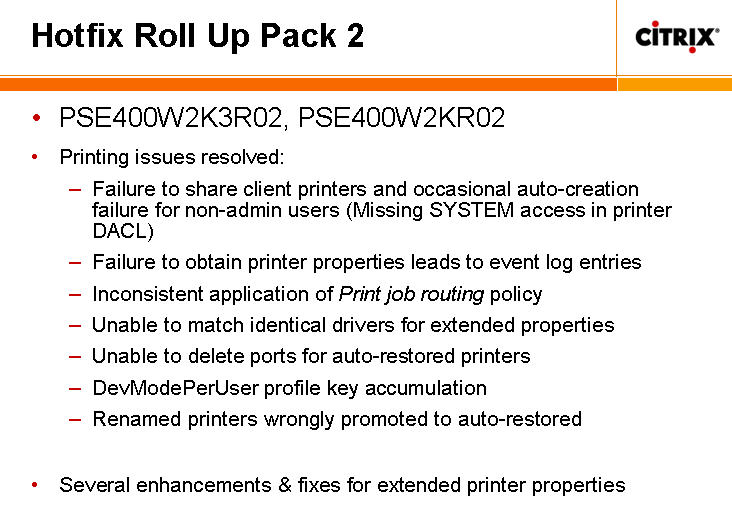
Citrix R02 Hotfix Rollup Pack released


Citrix just released the new R02 Hotfix Rollup Pack for servers running Windows Server 2003 with one of the following installed:
  • Citrix Presentation Server 4.0
  • Presentation Server 3.0 with Service Pack 2005.4
  • Citrix Access Essentials 1.5
  • Citrix Access Essentials 1.0

Before installing this hotfix rollup pack, you must uninstall the following hotfixes, if present, from Add/Remove Programs on the Control Panel. Failing to do so may lead to system inconsistencies:
  • PSE400W2K3029
  • PSE400R01W2K3004
  • PSE400R01W2K3053

Download it here.

I hope this fixes the print spooler crashes :)

maandag, augustus 14, 2006

Add /usr/sbin to user's PATH

  • Check what your current path is by typing echo $PATH
  • PATH=$PATH:/usr/sbin
  • export PATH
  • To add that PATH to a specific user(s), add the line(s) to /home/user/.bash_profile
  • Done :)

Service Console memory sizing in ESX 3.0

I read a very interesting statement on VMTN Discussion forums on Service Console memory sizing:

Quote:

"No, there should be no need to increase the size of the Service Console to run an increased number of VMs. The reason for doing that in previous releases is that part of our virtualization system ran in the Service Console and it required more memory with an increased number of VMs, thus obligating you to increase the amount of memory allocated to the Service Console. However, with 3.0, all of our virtualization infrastructure has been moved into the VMkernel, which means the Service Console is now essentially unaffected by the number of VMs you run.

So, the only reason you'd need to increase the amount of Service Consolememory is if you're running some memory-hogging app in it (such as a hardware monitoring tool or such)."

See this thread for more info!

donderdag, augustus 10, 2006

Short tutorial: ESX 3.0 cluster in-a-box with RDM

Hi guys,

I decided to write a small tutorial on clustering (in a box) with RDM on ESX 3.0.
What you need:
  • 1 ESX 3 server :)
  • 2 virtual nodes with the same config:
    • 2 virtual NICs, 1 to an external switch, 1 to an internal switch with no external pNICs
    • min. 2 virtual hard drives, on a separate virtual LSI Logic SCSI controller
  • A small LUN to use as the Quorum disk (100 Mb)

Each VM node should be configured with a separate LSI logic controller, 2 extra Hard disks (pointing to a Raw LUN, quorum and resource) and an extra "heartbeat" NIC. The SCSI controller should be set to "Virtual" when using a cluster-in-a-box (on 1 ESX server).


The extra harddisks are mapped directly to a SAN/iSCSI LUN via RDM in virtual compatibility mode (non‐pass‐through RDM).

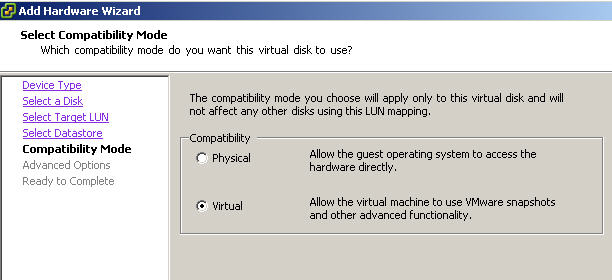
For the first node, use the add hardware wizard to add the extra disk and select "Mapped SAN LUN" to make a .vmdk disk that points directly to the RAW LUN (instead off a new/existing .vmdk disk on a VMFS datastore).


On the compatibility mode, select "Virtual".


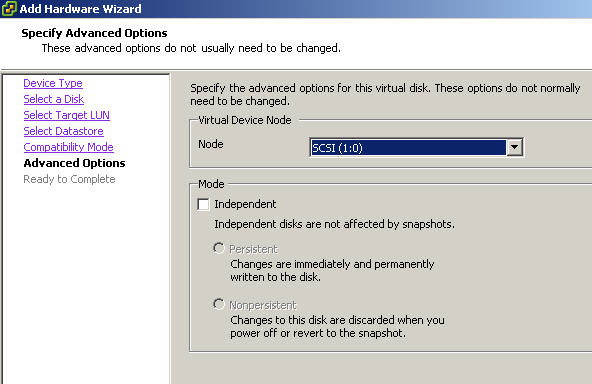
Make sure that you choose SCSI (1:0) and NOT (0:0)!


For the second node, follow the same procedure, but choose "Use an existing virtual disk" and point it to the .vmdk file created for the other node (should be something like "[iscsilun4-DS] Sr-Node1/Sr-Node1_1.vmdk"). Use the exact same config (SCSI (1:0) for the quorum disk, etc.).


That's about it! The rest of the configuration is a default cluster setup.

For extra info, consult this PDF on clustering

dinsdag, augustus 08, 2006

Microsoft reduces Softricity Licensing pricing by almost 85%

See the following article on Brian Madden's website for more info. This could mean serious competition for Altiris' SVS!

donderdag, augustus 03, 2006

Avoid Delayed Write Failed in Windows 2k/2k3 on ESX

For the Windows 2000 and Windows Server 2003 guest operating systems, you may want to increase the standard disk TimeOutValue so that Windows will not be extensively disrupted during failover.


1. Select Start > Run, type regedit.exe, and click OK.
2. In the left panel hierarchy view, double-click HKEY_LOCAL_MACHINE, System,
CurrentControlSet, Services, then Disk.
3. Select the TimeOutValue and set the Data value to x03c (hexadecimal) or 60 (decimal). By making this change, Windows waits at least 60 seconds, for delayed disk operations to complete, before generating errors.
4. Click OK and exit the Registry Editor program.

Resizing Windows 2003 system partition in Vmware

I came across a cool article explaining how to extend a Win2k3 System partition the "cheap-ass" way, by using Diskpart.exe.

Definitly check it out here!

woensdag, augustus 02, 2006

Citrix users see all printers

A customer had the following problem: for some reason, all users could see all other users printers in a CTX session. This is because the user(s) belong to a group that is a member of the local Power users or Administrators group. So watch out for this one!

Citrix "special" users explained

A brief explanation on Citrix special users:

ctx_smauser is the account used by Presentation Server's new print subsystem. You will find that many printing functions fail if this account doesn't have the correct rights.


ctx_configmgr is used by the Web Interface's central configuration service to allow you to copy WI config from one server to another.

vrijdag, juli 28, 2006

HP drivers compatibility guide - Citrix

HP and Citrix have updated their driver compatibility overview for july 2006. You can download it on the printingsupport website.

donderdag, juli 27, 2006

HP Proliant and Compaq MPS Table BIOS Settings for ESX Server

I read an interesting article on ESX on proliant servers:

Summary

HP ProLiant servers (and pre-merger Compaq ProLiant servers) require specific BIOS settings in order to run VMware ESX Server. These settings ensure that the physical hardware can be addressed properly and consistently by the VMkernel. Use of BIOS settings with values other than those identified below may result in operational instability.


Discussion

On HP ProLiant servers (and pre-merger Compaq ProLiant servers), the BIOS may not fully populate the PCI interrupt routing entries in the MP Configuration Table (part of the Intel MultiProcessor Specification) if the MPS Table Mode setting within the BIOS is incorrect. An incomplete MP Configuration Table may result in failure of an initial installation of ESX Server, failure to complete the boot process, or instability during normal operation.


For stable operation on these systems, ESX Server requires a BIOS MPS Table Mode setting of Full Table APIC. With the exception of the specific systems referenced below, the following BIOS settings must be applied in order if available:

  1. System Options > OS Selection: Select Windows 2000.

  2. Advanced Options > MPS Table Mode: Select Full Table APIC.

  3. When presented with multiple Windows options (Windows 2000, Windows Server 2003, Windows .NET, and so on) select Windows 2000. If both BIOS settings are available and can be modified, both must be set correctly. You should confirm these settings after any BIOS upgrade operation.


For the HP ProLiant DL 740 and DL 760 servers specifically, set the OS Selection BIOS setting to Linux to allow for proper operation when hyperthreading is enabled. The remainder of the BIOS settings, and the order in which they are applied, are as specified above.

If any BIOS setting is incorrect, you may see one or more messages in /var/log/messages or /var/log/vmkwarning on the Service Console similar to the following:
  • May 11 22:36:30 esx101 vmkernel: 0:00:00:00.00 ALERT: Chipset: 303: no PCI entries - Check BIOS Settings

  • May 11 22:36:30 esx101 vmkernel: 0:00:00:00.000 cpu0) ALERT: Chipset: 433: no PCI entries in MPS table - check BIOS settings

  • May 11 22:36:30 esx101 vmkernel: 0:00:00:00.000 cpu0) WARNING: IOAPIC: 986: no PCI entry for busID 2 busIRQ 8 - trying ISA irq 15


You may also see unnecessary hardware interrupt sharing, which is explained in detail in knowledge base article 1290 at www.vmware.com/support/kb/enduser/std_adp.php?p_faqid=1290.

You may need to use the ROM-Based Setup Utility (RBSU), SmartStart CD, or other BIOS configuration tool to make these adjustments. Hewlett-Packard's Web site includes extensive documentation on how to adjust BIOS settings on HP and Compaq systems, including generalized RBSU guides which may be found at search.hp.com/query.html?qt=title%3A%22ROM-Based+Setup+Utility+User+Guide%22.

The "OS Selection" section of the HP RBSU User Guide notes that, in certain circumstances, adjusting the OS Selection BIOS setting may result in an automatic change of the MPS Table Mode BIOS setting (emphasis added):

The OS Selection option allows you to select the primary OS for the server. A list of supported OSs for the server displays on the menu, with the ROM defaulting to Microsoft Windows 2000 when the server supports it. Default server Multi Processor (MP) settings and PCI Hot Plug reservation settings are automatically set based on the OS selected.

Although an automatic change may occur, the individual BIOS settings should be confirmed explicitly if you intend to use this system with VMware ESX Server. For additional assistance in making these changes, please contact HP Technical Support.
Unlimited virtualization rights for Windows 2003 Datacenter edition

Quote:

"In October 2005, Microsoft announced unlimited virtualization rights would be available with the Datacenter Edition of Windows Server code name “Longhorn,” but decided to make these virtualization rights available with Windows Server 2003 R2 Datacenter Edition based on customers’ requests to make licensing easier and more cost-effective for large-scale virtualization."


Great news! Now it makes sense to buy a big machine as an ESX host!

zaterdag, juli 22, 2006

iSCSI tutorial for ESX 3.0 with WinTarget

Hi guys,

I decided to write a small tutorial on iSCSI configuration with ESX 3.0. I used the Sofware Initiator build into the latest ESX 3.0 to configure a small iSCSI testenvironment with WinTarget (recently bought by Microsoft).

Ok, here's how I did it:
- First, install f.e. Windows 2003 server on a dedicated iSCSI box. I used an old Proliant 1600. After the initial config, install WinTarget on it. You now have 2 options:
1) use a complete volume as an iSCSI LUN
2) use a file as an iSCSI LUN
I used both for testing :)

- Configure a host(s), f.e. esx1 and esx2 with the appropriate IQN name (i used iqn.1998-01.com.vmware:esx1 for example) and add the freshly configured devices/disks

- DO NOT configure the software iSCSI configuration via the VI client, but use the tips in Mike's Service Console guide.

  • Create a VMKernel switch (via Add networking)

  • Remember to set the default gateway for the newly created VMKernel switch

  • Use the commandline to enable the vmhba40 (Software iSCSI initiator) and add the IP of your iSCSI target.

    • Use the command esxcfg-swiscsi –d and esxcfg-swiscsi –k to disable & kill all iSCSI processes

    • Next, use the command esxcfg-swiscsi –e to enable it

    • Use vmkiscsi-tool -D -a 192.168.2.210 vmhba40 to add the iSCSI target's IP address

    • Now try executing vmkiscsi-tool -l -T vmhba40 to see if it recognizes the iSCSI target. It will tell you "No targets are configured" if it does not see anything

    • Now is the time to fire up your VI client & do a rescan (in Configuration => storage adaptors)

    • Create a VMFS

    • Done :)

You can also use f.e. Openfiler (Beta 2 version), Fedora Core, etc.
Just try it, you will like it!

Greetz, Vince

Virtual Desktop Infrastructures (VDI)

I read an interesting article on http://www.brianmadden.com on VDI (or Virtual Desktop Infrastructure). Check it out here

donderdag, juli 20, 2006

Sys/Winternals on the way to Microsoft!

Mark & his world-famous free tools (regmon, filemon, handle, etc.) have been acquired by Microsoft! See this link for more info.

dinsdag, juli 18, 2006

vrijdag, juli 14, 2006

VirtualCenter 1.4 is available for download

As stated in the title :) VC 1.4 is now available for download on the vmware site. It includes some bugfixes.

Intro in to Longhorn Terminal Services

Microsoft has a very interesting recorded session on all new TS features that will be included in Longhorn Server.

Features include:

  • SSL TS Gateway

  • Web Interface

  • Seamless applications & application publishing


The session can be viewed here

donderdag, juli 13, 2006

HP - G5 servers are available!

The new G5 (Generation 5) server lines are made available on the HP website (http://www.hp.com). Check them out! There are a lot of new features, including:

  • Dual core CPU's

  • New SmartArray controllers (SAS/SATA!)

  • The brand new SAS (Serial Attached Scsi) drives

  • PC2-5300 fully buffered RAM

  • 1066 Mhz FSB technology

  • An last but not least... The all new design


Check out the new DL380 G5!

VMware Server released

Vmware just released the final build of there FREE Vmware Server. This is a direct competitor of M$ Virtual Server 2005 and is a replacement for the Vmware GSX server.

See http://www.vmware.com for more info!